How to Start Using AI Tools in 2026 (Step-by-Step Guide for Beginners)


AI is everywhere right now. And honestly? It can feel really overwhelming.
I remember the first time I heard about ChatGPT. It was 2021 and social media was exploding with people saying artificial intelligence was going to change the world. At the time it still felt like speculation, almost like something out of a sci-fi movie that wasn’t quite real yet. Then this company called OpenAI just dropped ChatGPT on the world. And everything changed.
I wasn’t even that interested at first. But curiosity got the better of me. So I opened it up and started typing about the things I’d always wanted to know — space exploration, dark matter, all those big mysterious topics that Google never really satisfied. And the answers were just there. Instantly. Clearly. It was the weirdest and coolest thing I had ever seen.
That was the start of my AI journey. And if you’re reading this right now — this is yours.
Learning AI doesn’t have to be complicated. I promise. In this guide I’m going to walk you through exactly how to start using AI tools as a complete beginner. Step. By. Step. By the end you’ll know which tools to try first, how to actually use them, and how to make AI work for YOUR life. Let’s go!
What Are AI Tools and Why Should You Care?
AI tools are software programs that use artificial intelligence to help you do things faster and easier. Think of them like a super-smart assistant that never sleeps, never gets frustrated, and is always ready to help.
That’s really it. No complicated tech stuff required.
You’ve probably already used AI without even realizing it. When Netflix recommends a show you end up loving — that’s AI. When Gmail suggests how to finish your sentence — that’s AI. When Siri or Alexa answers your question — yep, that’s AI too.
Most of the tools beginners use fall under a category called generative AI — meaning they generate text, images, or ideas based on what you ask. That’s exactly what ChatGPT, Claude, and Gemini do. You type something in and they generate a helpful response. Simple as that.
So what makes AI tools different from regular apps?
Regular apps do one specific thing. A calculator calculates. A calendar schedules. But AI applications like ChatGPT and Gemini are designed for everyday people — not just tech experts. They adapt to what you need, understand what you’re asking, and generate responses that are actually useful. It’s like the difference between a vending machine and a personal chef.
Now here’s where it gets a little nerdy — but stick with me for just a second.
Under the hood these tools are powered by neural networks — basically a system designed to think a little like the human brain. They run on deep learning, which is what allows AI tools to understand your questions and give you surprisingly accurate answers. And the whole thing is built on machine learning — which just means the AI gets smarter the more it’s used.
You don’t need to understand any of that to use these tools. But it’s kind of cool to know, right?
Don’t worry about mastering foundational AI concepts right away. You don’t need them to get started today. What matters is knowing that these tools exist, that they’re free to try, and that they’re designed for people exactly like you.
Here’s why this matters right now.
Over 100 million people started using ChatGPT in its first two months alone. That’s faster than any app in history. And the people jumping in early? They’re saving hours every week, getting more done, and honestly — having a lot of fun with it.
Here are some real things beginners use AI tools for every single day:
- Writing emails and messages faster
- Brainstorming ideas when they feel stuck
- Summarizing long articles or documents
- Creating social media captions in seconds
- Planning meals, schedules, and to-do lists
- Getting quick answers without digging through Google
I remember asking ChatGPT to write me a home workout plan with no weights focused on building muscle. It gave me a complete detailed plan in about 15 seconds. Here’s the kicker — back in 2015 I had paid $129 for a workout and diet program that covered basically the same stuff. ChatGPT gave me something just as good for free. That was the exact moment I realized this tool wasn’t just cool — it was genuinely life changing for everyday people.
The 3 Biggest Mistakes Beginners Make With AI Tools (And How to Avoid Them)
Let’s save you some frustration right up front.
Most beginners stumble in the same exact ways when they first start with AI tools. You don’t need a ton of AI knowledge to avoid these mistakes — you just need to know they exist. So let’s fix that right now.
Mistake #1: Trying to learn every AI tool at once.
This is the big one. You Google “best AI tools” and suddenly there are 47 different options staring back at you. Jasper. Midjourney. Claude. Gemini. Perplexity. Runway. It’s a lot.
Here’s the truth — you only need ONE tool to start. Just one. Pick ChatGPT or Google Gemini, stick with it for two weeks, and actually learn how to use it well. Jumping between tools before you’ve mastered one is like switching gyms every three days and wondering why you’re not getting stronger.
Real AI fluency doesn’t come from consuming more information — it comes from actually using the tools.
Mistake #2: Getting caught in the AI rabbit hole.
This one is sneaky — and it’s the mistake I made more than any other.
I would spend hours inside ChatGPT asking questions, refining workout plans, building sleep schedules, gathering information. It felt incredibly productive. But I wasn’t actually doing anything with it. I was just consuming. It almost felt like reading a book about all my desires and plans without ever executing them. The dopamine hit of getting information from AI is real — and it can become a trap fast.
Be aware of constant consumption and lack of action. AI is an incredibly powerful tool. But if you fall into the rabbit hole of never-ending information absorption without doing anything with it — it’s all a waste of time.
Part of using AI well is practicing responsible AI — being thoughtful about what you ask it to do and always double checking important information it gives you.
Mistake #3: Expecting perfect results on the first try.
If the first answer isn’t right don’t close the tab. AI tools are a conversation not a vending machine. Say “make it shorter” or “try a different angle” and keep refining. The magic happens in the back and forth.
I also learned the hard way about keeping your chat threads clean. I once used the same ChatGPT thread for everything — workouts, sleep schedules, space questions, meal plans — until I hit my daily limit over and over. Eventually the AI started mixing up information from different topics in the same thread. That’s called an AI hallucination and it happens when the conversation gets too long and cluttered. Start a fresh thread for each new topic. Trust me on this one.
The Best Free AI Tools for Beginners to Start With Today
Good news — you don’t need to spend a single dollar to get started with AI.
Some of the most powerful free AI tools in the world have generous free versions that are more than enough for a complete beginner. All of these free AI systems are beginner-friendly and require zero technical setup. Here’s a quick breakdown of the best ones and who they’re best suited for.
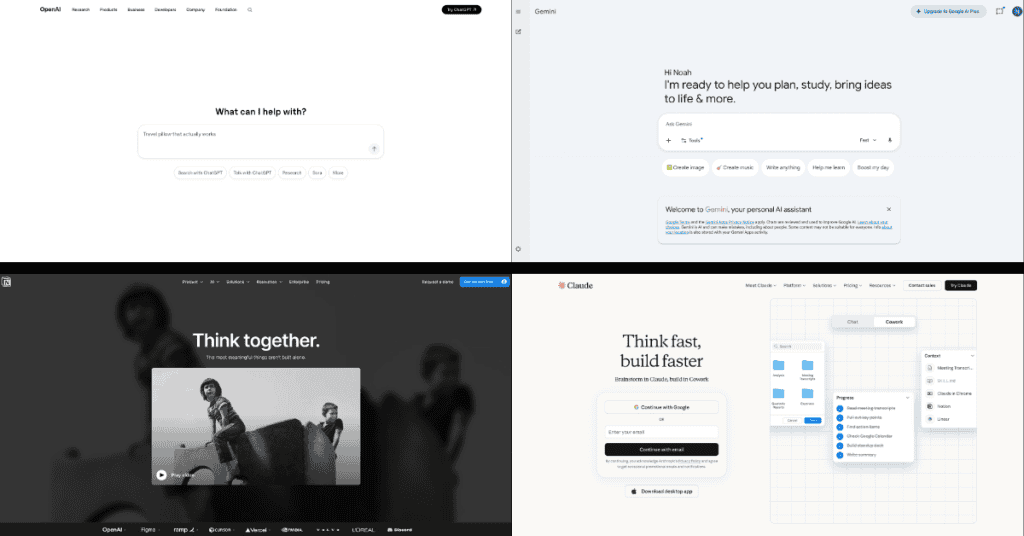
ChatGPT (Free Tier) — Best Overall Starting Point
ChatGPT is the one that started it all and it’s still the best place for most beginners to begin. The free version gives you access to GPT-4o mini which is genuinely impressive for everyday tasks. You can write emails, get answers to questions, brainstorm ideas, summarize text, and so much more.
When I first started using ChatGPT the free plan was honestly incredible. I wasn’t even sure a paid plan existed at first — the free version felt like more than enough. And for a beginner just getting started? It still is.
Google Gemini — Best for Google Users
If you already live inside Google Workspace — Gmail, Google Docs, Google Calendar — then Gemini is going to feel like a natural extension of the tools you already use. It’s part of Google Cloud, which means it’s backed by Google’s massive infrastructure and updated regularly. One thing beginners love about Gemini is that it searches the web in real time — so it always has current information.
Google also has more advanced tools like Vertex AI for developers — but as a beginner you won’t need to worry about that yet. Gemini is your starting point.
Claude AI — Best for Longer, More Detailed Tasks
Claude is made by a company called Anthropic and it’s quickly becoming a favorite for people who need help with longer pieces of writing, detailed explanations, or thoughtful responses. A lot of beginners find Claude’s tone feels more natural and conversational than other tools. The free version is excellent.
Notion AI — Best for Staying Organized
If you struggle with staying organized — keeping track of tasks, notes, and projects — Notion AI is worth checking out. It sits inside the Notion app and helps you write, summarize, and organize your thoughts all in one place.
Want to generate images too?
Some AI tools can also generate images from a simple text description. Tools like Midjourney and Adobe Firefly are great for this once you’re ready to explore beyond text-based AI. But don’t worry about that for now — text-based tools are the perfect place to start.
So which one should YOU start with?
Start with ChatGPT. It’s where most people begin and for good reason. Once you feel comfortable there explore others. But don’t jump around too early — pick one and actually learn it first.
What Is a Prompt? (And How to Write One That Actually Works)
A prompt is simply what you type into an AI tool to tell it what you want.
That’s it. No mystery. No technical skill required. If you’ve ever typed a question into Google you already understand the basic concept. The difference is that AI tools can handle way more detail — and the more detail you give them the better your results will be.
Prompt writing is one of the most practical skills you can build as an AI beginner — and it gets easier fast. It’s also one of the core AI skills every beginner should develop first. Once you understand how prompts work you’ll be able to apply AI to almost any task in your life.
Think of it this way. If you walked up to a friend and said “write something for me” — they’d have no idea where to start. But if you said “write me a short friendly email to my boss asking for Friday off” — now they’ve got something to work with. Prompts work the exact same way.
Here’s a simple 3-part formula that works every time:
Context + Task + Format
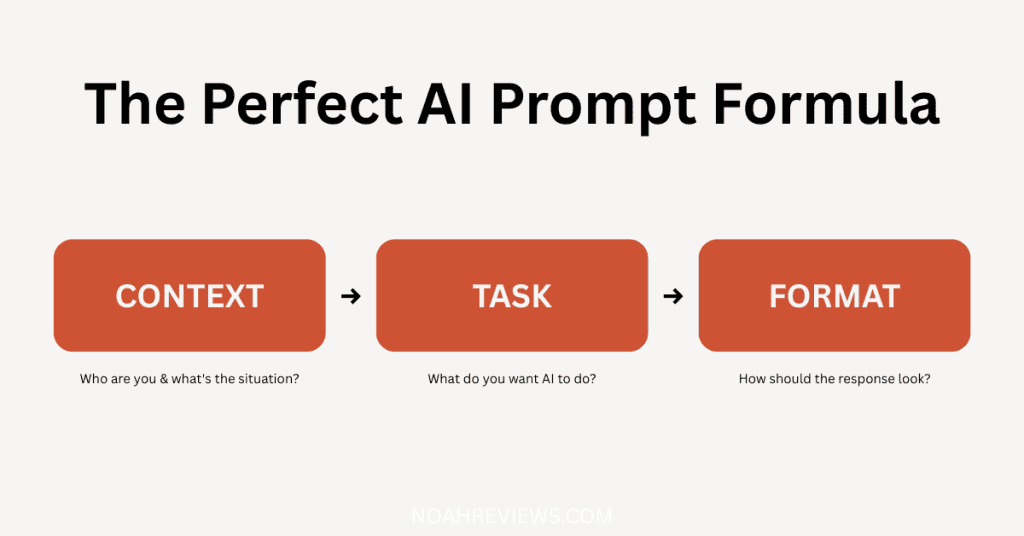
- Context: Who are you and what’s the situation?
- Task: What do you want the AI to do?
- Format: How do you want the response to look?
Let’s see this in action.
Weak prompt: “Write an email.”
Strong prompt: “I’m a small business owner. Write a short friendly email to a client letting them know their order will be delayed by two days. Keep it under 100 words and end with an apology.”
See the difference? The second prompt gives the AI everything it needs to nail it on the first try.
Here are 3 more examples of weak vs. strong prompts:
| Weak | Strong |
|---|---|
| “Give me ideas” | “Give me 5 Instagram caption ideas for a coffee shop targeting young professionals” |
| “Explain AI” | “Explain what AI tools are in simple terms like I’m explaining it to my grandma” |
| “Make a plan” | “Create a simple weekly meal plan for one person on a $75 budget focusing on easy 30-minute meals” |
Advanced users even use prompts for code generation — asking AI to write or fix computer code. But don’t worry about that for now. Focus on the basics first and the advanced stuff comes naturally later.
Here’s something I wish someone had told me early on. If you’re an anxious action taker — someone who wants to do things but struggles to actually start — tell the AI that. Literally type it out. Say “I have a hard time taking action and I need baby steps without pressure.” The AI will adjust completely. It’ll break everything down into tiny manageable steps that don’t feel overwhelming.
It’s kind of insane how you can literally work around how you feel — and still achieve your goal. These are the kinds of AI skills that nobody talks about but make a huge difference. That one trick alone changed how I use AI tools every single day.
Step-by-Step — How to Use ChatGPT for the First Time
ChatGPT is the best starting point for most beginners — and getting set up takes less than two minutes.
Think of this section as your learning path — a clear step-by-step starting point so you never feel lost. The best part about learning AI tools is that you can do it completely at your own pace. No deadlines. No pressure. Just you and a text box.
Here’s exactly what to do.
Step 1: Go to chat.openai.com
Open your browser and head to chat.openai.com. Click “Sign Up” to create a free account. You can sign up with your email or use your existing Google or Microsoft account to make it even faster.
Step 2: Verify your account
If you sign up with email you’ll get a quick verification email. Click the link and you’re in. The whole process takes about 90 seconds.
Step 3: Start a new chat
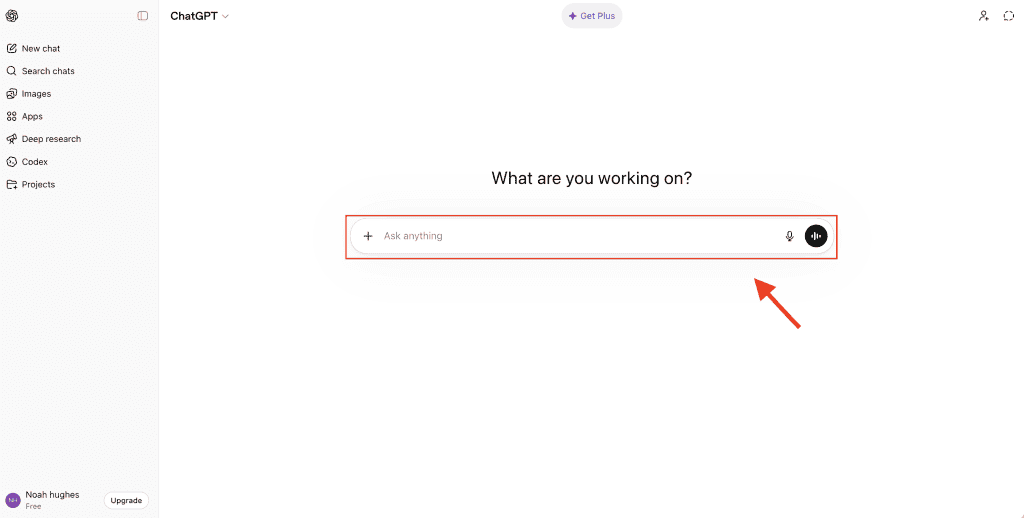
Once you’re logged in you’ll see a clean simple interface with a text box at the middle or the bottom. That’s where you type your prompt. Click on it and you’re ready to go.
Step 4: Type your first prompt
Not sure what to type first? Here are 5 easy things to try on your very first day:
- “Explain what you can help me with as a beginner”
- “Write a short thank you email to a coworker who helped me out this week”
- “Give me 5 dinner ideas using chicken, rice, and vegetables”
- “Explain [something confusing] in simple terms like I’m a complete beginner”
- “Help me write a bio for my Instagram profile — I’m a [your job/hobby]”
Step 5: Refine your results
If the first response isn’t quite right — don’t close the tab. Just reply in the chat. Say “make it shorter” or “make it sound more casual” or “give me another version.” ChatGPT remembers the whole conversation so you can keep refining.
One important tip — keep each chat thread focused on one topic. When I first started I used the same thread for everything and eventually the AI started mixing up information and giving me weird jumbled responses. Start a fresh chat for each new topic and you’ll get much cleaner results every time.
Once you’ve got the basics down there are tons of online courses and YouTube videos that can take your skills even further. But you absolutely don’t need them to get started today. What you’ve got right here is more than enough to begin.
Easy Ways to Use AI Tools in Your Everyday Life
Here’s where things get really fun.
Once you know the basics AI tools start fitting into your daily life in ways you never expected. The range of AI applications for everyday life is honestly mind-blowing once you start exploring. And we’re not talking about complicated high-tech stuff. We’re talking about simple practical things that save you time and mental energy every single day.

Writing emails and messages faster
Whether it’s a tricky email to your landlord, a professional message to a client, or even just a text you don’t know how to word — AI can draft it in seconds. Describe the situation, paste in the draft, and tweak from there.
Planning your week and to-do lists
Feeling overwhelmed by everything on your plate? Tell an AI tool what you need to get done and ask it to build you a simple weekly schedule. It’s like having a personal assistant for free.
Research and getting quick answers
Instead of falling down a Google rabbit hole for 45 minutes just ask an AI tool your question directly. Clear summarized answer in seconds.
Brainstorming when you feel stuck
Blank page syndrome is real. Whether you’re trying to come up with content ideas, gift ideas, business names, or just don’t know what to cook for dinner — AI tools are incredible brainstorming partners. Once you see how easy it is to apply AI to small daily tasks it becomes second nature fast.
Using AI for blogging and content creation
This one changed everything for me personally. When I got into blogging and started using AI as a writing partner I went from spending a whole week on a single blog post to finishing one in about an hour. On topics I’d never even written about before. It felt like running a one-person business without needing to hire a whole team — AI became my researcher, my editor, my brainstorming partner all in one.
One thing I had to unlearn though — mass production without quality. I remember thinking I could pump out 100 blog posts at lightning speed and skip the editing process entirely. That was wrong. AI gives you an incredible foundation but the humanization process — reading it, editing it, adding your voice — that part still matters a lot. Don’t skip it.
Exploring more advanced AI features
Once you’re comfortable with the basics it’s worth knowing that more advanced users are even building AI agents — basically AI assistants that can complete tasks automatically on your behalf. AI agents are a future rabbit hole worth exploring once you’ve nailed the fundamentals. But for now — focus on the basics and let the advanced stuff come naturally.
Is AI Safe to Use? What Every Beginner Should Know

This is the question almost every beginner has — and it’s a really smart one to ask.
The short answer is yes, AI tools are safe to use. But like any tool there are a few simple rules that will keep you protected.
What data do AI tools actually collect?
The machine learning models behind tools like ChatGPT and Gemini are trained on massive amounts of data — which is why they can answer such a wide range of questions. Most AI tools collect your conversations to help improve their systems. It’s similar to how apps like Siri or Alexa work. This isn’t a reason to panic. But it IS a reason to be thoughtful about what you share.
The major AI companies all have responsible AI guidelines in place — meaning they’re actively working to make these tools safer and more reliable over time.
The golden rule: Never share sensitive personal information.
Do not type in your social security number, bank details, passwords, or private medical information. Treat your AI chat window like a public conversation — not a private diary.
How to adjust your privacy settings
In ChatGPT go to Settings → Data Controls and turn off the option that allows your chats to be used for training. It takes about 30 seconds. Google Gemini and Claude have similar settings worth exploring once you’re set up.
What to Do After Your First Week Using AI Tools

So you’ve made it through your first week. You’ve tried a tool, written some prompts, and started to get a feel for how this works.
Now what?
Build a simple daily AI habit
The fastest way to get better is to use AI tools every single day — even for small things. Start your morning by asking AI to help you plan your day. Use it to draft a message you need to send. Small daily habits compound fast. As you keep using AI tools daily you’ll naturally develop a deeper understanding of how to get the most out of them.
Watch out for the rabbit hole
This is the most important thing I can tell you after your first week. Learning AI skills is one of the best investments you can make in yourself right now — but only if you pair that learning with real action.
The biggest trap I fell into wasn’t using AI wrong — it was using it too much without taking action. I’d spend hours refining plans, absorbing information, asking follow-up questions — and never actually doing anything with it.
Information without action is just entertainment.
If you catch yourself constantly consuming and never executing — stop. Close the chat. Go do the thing. Even imperfectly. Real world results will always teach you more than another round of AI refinement ever will.
Here’s something worth knowing.
The AI skills employers are actively looking for are growing fast. Getting comfortable with these tools now puts you ahead of the curve — not just personally but professionally too. Generative AI is evolving at an incredible pace and the people building familiarity with it today are going to have a serious advantage tomorrow.
Try one new use case per week
Week one — emails. Week two — brainstorming. Week three — research. Keep it simple and build real confidence with each new skill before moving on. You don’t need to understand machine learning models at a technical level — just knowing how to use the tools they power is more than enough.
Join a beginner-friendly AI community
Reddit’s r/ChatGPT is a great place to start. People share prompts, tips, and discoveries every single day. It’s one of the fastest ways to level up without feeling overwhelmed.
Remember — you’re already past the hardest part.
The hardest part of learning AI tools is starting. You’ve done that. Everything after this gets easier and more intuitive. Just keep going — and make sure you’re actually using what you learn. 🙌
Questions? We Have Answers.
Here are the Frequently Asked Questions About Using AI Tools as a Beginner
